
Local automation API
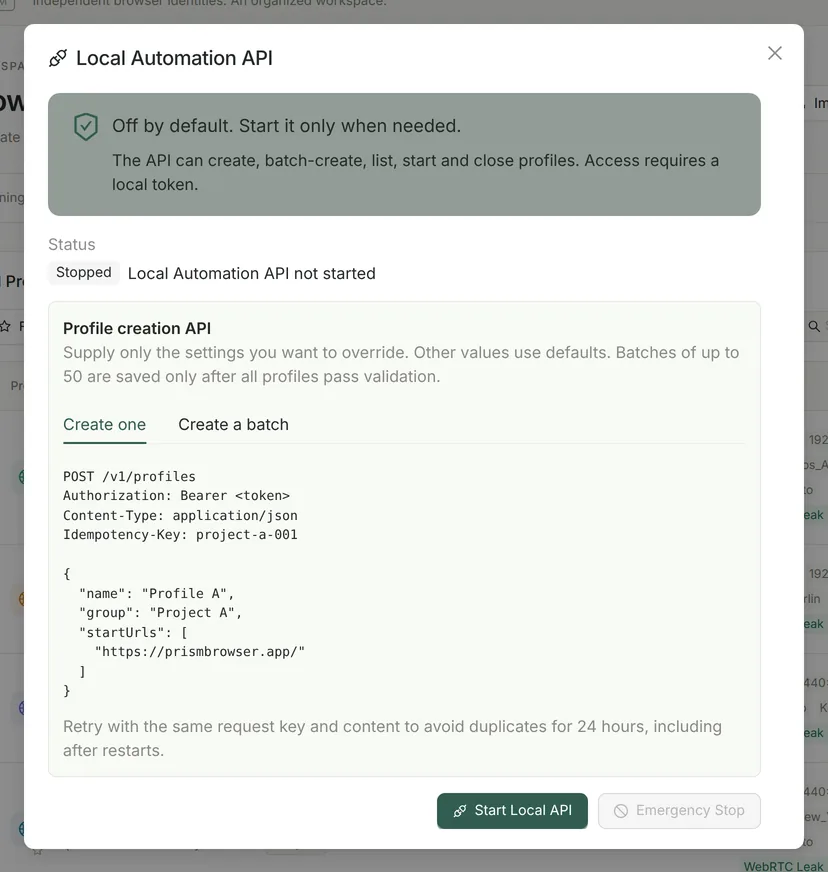
Open “Automation API” in the sidebar and click “Start Local API”. Prism shows the API address (a random port on 127.0.0.1) and the access token for this session. The token is shown only once and stops working when the API stops.
| Request | What it does |
|---|---|
| GET /v1/status | Service status |
| GET /v1/profiles | Lists profiles: number, name, group, tags, status, last opened time |
| GET /v1/profiles/{id}/status | Gets the status of one profile |
| POST /v1/profiles/{id}/start | Launches a profile with the same proxy pre-check and concurrency limit as the app |
| POST /v1/profiles/{id}/close | Closes a profile |
| POST /v1/profiles | Creates one profile with the name, group, proxy and fingerprint you choose (0.3.22 and later) |
| POST /v1/profiles/batch | Creates 1–50 profiles at once, saved only if all of them are valid (0.3.22 and later) |
curl -H "Authorization: Bearer $PRISM_TOKEN" http://127.0.0.1:$PRISM_PORT/v1/profiles
curl -X POST -H "Authorization: Bearer $PRISM_TOKEN" http://127.0.0.1:$PRISM_PORT/v1/profiles/$PROFILE_ID/start- Only local requests are accepted: the Host header must match the API address, and requests with a browser Origin header or query parameters are rejected (only the creation endpoints accept a JSON body), so web pages cannot call the API directly.
- Up to 120 requests per minute (shared with the local MCP bridge).
- The API can create, query, launch and close profiles; it cannot edit or delete profiles or read browser data. The API itself exposes no Puppeteer / Playwright debugging endpoint (the Windows version opens a random debugging port on 127.0.0.1 for internal control; this is not a public interface).
- “Emergency Stop” closes the profiles launched through the API; calls are recorded in a local audit log.
For request rules, response fields, error codes and Python / Node.js examples, see the local API reference.
Local scheduled tasks
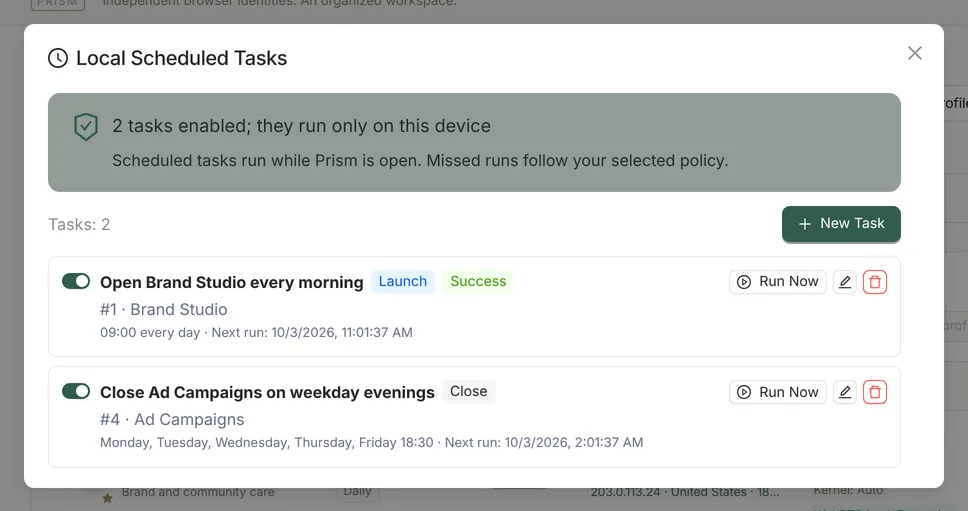
| Setting | Options |
|---|---|
| Action | Launch Profile / Close Profile |
| Repeat | Once / Daily / Weekly (choose one or more days, Sunday to Saturday) |
| Run At | Local time and time zone of this computer |
| Missed Run | Catch Up Once Within 24 Hours / Skip This Run |
| Retry on Failure | 0–3 retries, 1–60 minutes apart |
- Scheduled tasks run only while Prism is running; there is no background service. Prism checks for due tasks every 15 seconds and runs up to 2 at a time.
- Use “Run Now” to test a task. A profile referenced by a scheduled task cannot be deleted until you remove it from the task.
- If the Pro license becomes inactive, scheduling pauses. Tasks are kept, and you can still disable or delete them.
Ways to combine them
Work profiles ready when your day starts
Launch your usual profiles at 09:00 every day and close them before you leave, with fewer manual steps and fewer profiles opened by mistake.
Start and stop profiles in bulk from scripts
In your own script, call GET /v1/profiles to find the profile IDs, then launch them in order; launches follow the same logic as in the app.
Hand off to AI
After the profiles launch, MCP can read pages and complete the next steps in the profiles you have authorized.
FAQ
- Can I run custom scripts or RPA workflows?
- Scheduled tasks can only launch and close profiles, and the API does not run scripts either. For page-level actions, use MCP in Pro or install your own extensions in the profile.
- Is it compatible with other antidetect browsers’ APIs?
- No. Prism uses its own local API; the endpoints are listed in the table above.
- Do scheduled tasks run when Prism is closed?
- No. Scheduled tasks depend on Prism running; depending on your settings, a missed task can run once within 24 hours.