
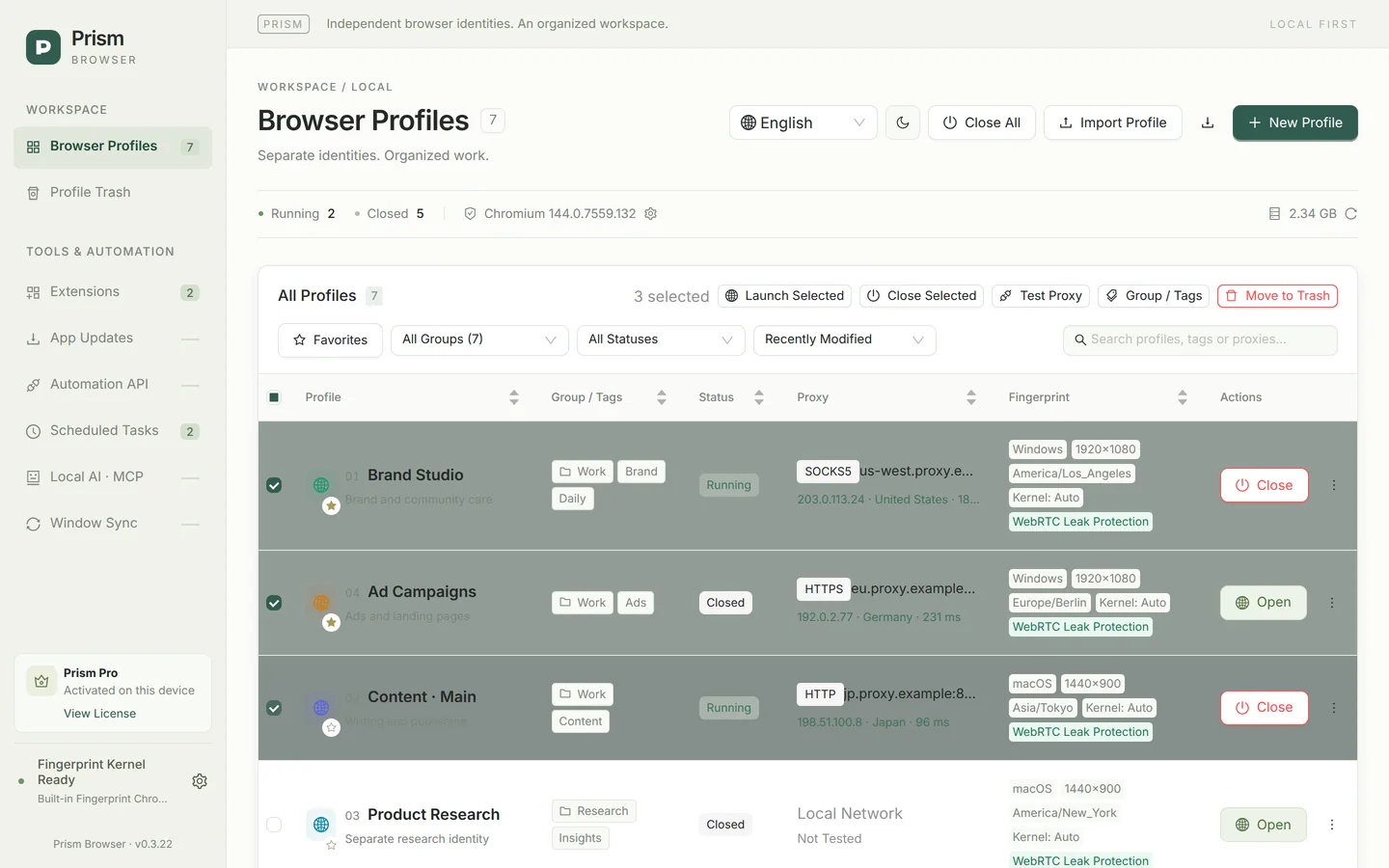
Profile list: status at a glance
- Each row shows the number and name, notes, favorite star, group and tags, running status, proxy test result (exit IP · location · latency) and fingerprint summary (OS, resolution, time zone, kernel, WebRTC policy).
- Search matches numbers, names, notes, groups, tags, proxy hosts and time zones.
- Filter by group, status (Closed / Running / Needs Attention) and favorites only; sort by recently modified, recently opened, name or recently created, with favorites always on top. You can also click column headers to sort.
- Statuses include Closed, Starting, Running, Closing, Orphaned Process and Error; orphaned processes can be ended with one click.
Bulk actions
| Action | Description |
|---|---|
| Bulk launch | Starts profiles one at a time in number order: once one has started, the next starts about 1.5 seconds later. |
| Bulk close / Close All | Closes 3 profiles at a time in parallel; “Close All” retries in several rounds to make sure the processes exit. |
| Bulk proxy test | Up to 100 profiles at a time, 5 in parallel; results are written back to the list. |
| Bulk group change / add tags | Up to 500 at a time; set or clear the group, or add tags. |
| Bulk move to Trash | Up to 500 at a time; the profiles stay on this computer together with their browser data. |
Whether a launch comes from the interface, the local API or a scheduled task, at most 3 profiles can be in the “Starting” state at the same time; the rest wait in a queue. If some items in a bulk task fail, each failed profile is listed with its reason, and the successful ones are unaffected. Bulk editing of proxy or fingerprint settings is not available yet.
CSV import: create up to 500 profiles at once
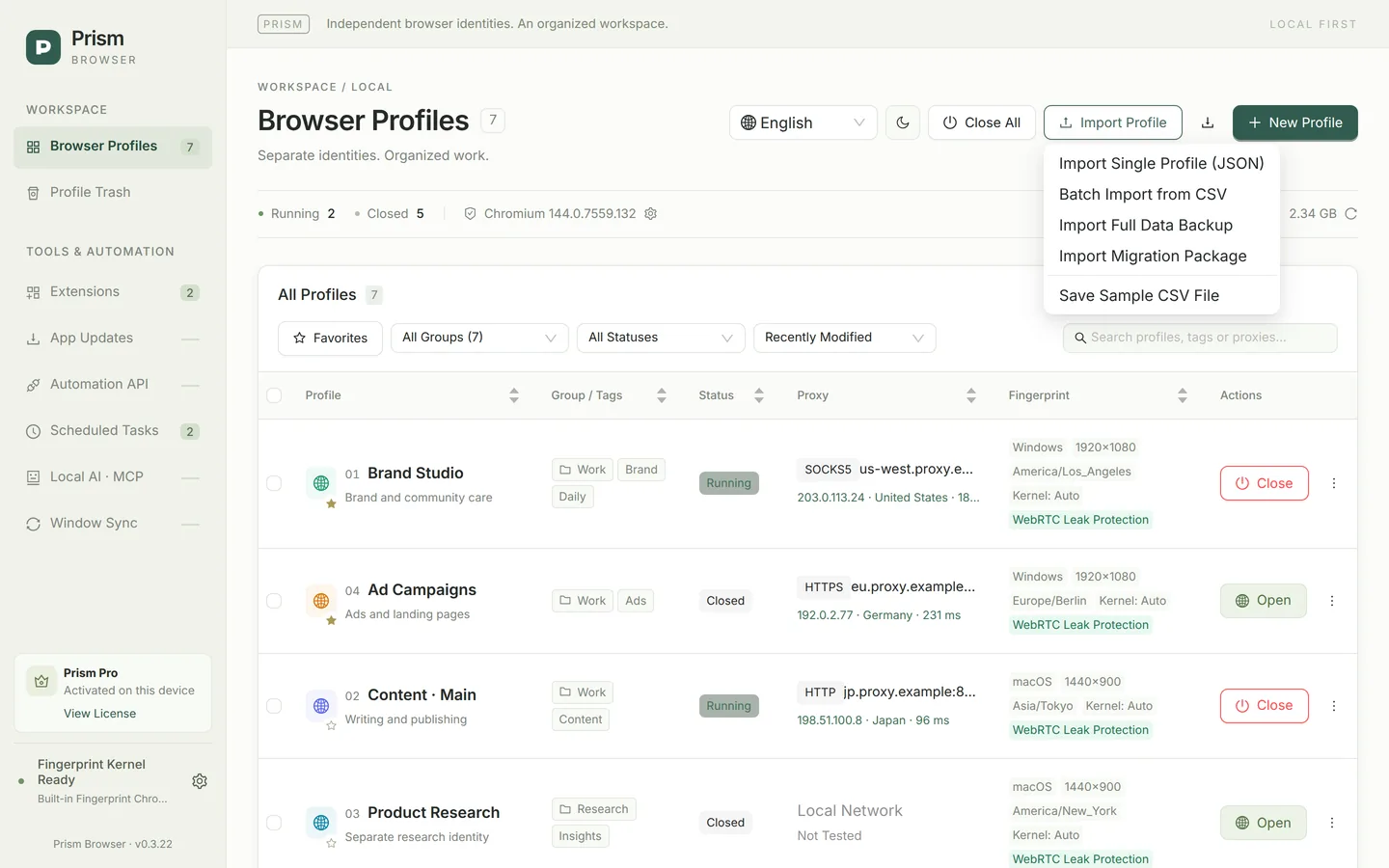
Save the sample file
In the “Import Profile” menu, choose “Save Sample CSV File”. Sample rows that start with # are only explanations and are not imported; copy a sample row and edit it.
Fill in the columns you need
Only name is required. Common columns include group, tags, note, start_urls and color; proxy_protocol (direct / http / https / socks5), proxy_host, proxy_port, proxy_username and proxy_password for the proxy; plus fingerprint_seed, brand (Chrome / Edge), language, accept_languages, timezone, webrtc_policy, window_mode and more. Separate multiple values with |.
Import and check
Choose “Batch Import from CSV”. Each file can have up to 500 rows and 2 MB. Prism validates every row first, and if any row has an error, no profiles are created at all, so nothing is left half-done.
Pro users can also create profiles from scripts or with AI: the local API and MCP create 1–50 profiles per request, validate the whole batch the same way and do not launch them.
Numbers, colors and window identification
- Each profile has a permanent number that is never reused, even after deletion, so it is easy to refer to in spreadsheets, scripts and conversations.
- Browser window titles show “[number] name”; on macOS the Dock icon carries a number badge, and the Windows taskbar groups windows by profile and shows the number, so you are less likely to switch to the wrong window when many are open.
- You can give a profile a color, notes (up to 500 characters) and up to 20 tags, and set a fixed window size and desktop position (negative coordinates for secondary displays are supported).
Duplicating a profile
“Duplicate Profile” copies the group, tags, extensions, startup pages, kernel, window settings and proxy (including the saved password), and generates a new fingerprint seed and GPU identity; cookies and other browser data are not copied. This makes it easy to use a configured profile as a template.
Profile Trash
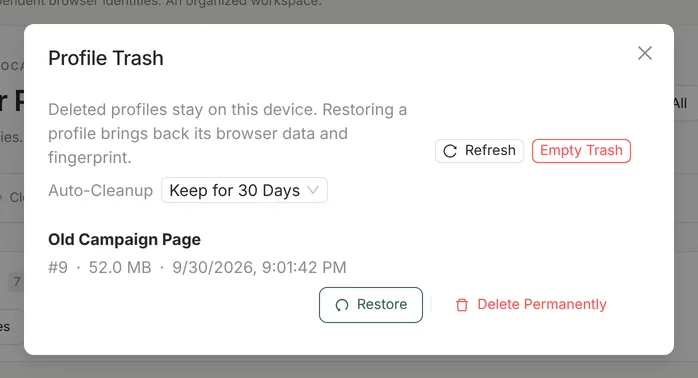
- When you delete a profile, its configuration and complete browser data move to the Trash on this computer instead of being permanently deleted right away.
- Restoring brings back the original browser data and fingerprint seed; the original number is kept if it is not in use.
- Auto-cleanup can be set to “Never / Keep for 7 Days / Keep for 30 Days / Keep for 90 Days” and runs when the app starts.
- A profile used by a scheduled task cannot be deleted until it is removed from the task.
About “unlimited”
Community does not limit the total number of local profiles. How many can run at the same time depends on memory, CPU, disk and page load; a single bulk creation, CSV import, bulk edit or migration package handles up to 500 profiles.