
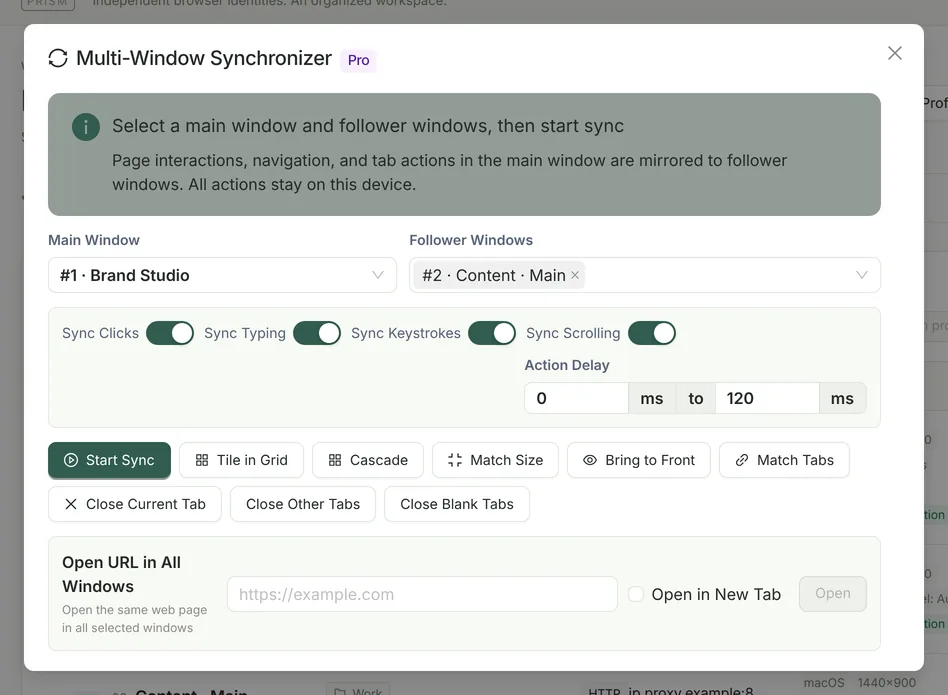
What is synced
| Type | Description |
|---|---|
| Clicks | Left, middle and right buttons; single, double and triple clicks. Follower windows locate the element (by id, name, aria-label and similar attributes combined with its viewport position), scroll it into view, then click its center. |
| Typing | Field values and cursor positions in input, textarea, select and editable areas, compatible with React / Vue controlled components, pasting, autofill and IME input. |
| Keystrokes | Special keys such as Enter, Tab, the arrow keys, Backspace and Esc, plus Ctrl / Alt / Command shortcuts; ordinary characters are synced through “Typing”. |
| Scrolling | Page and element scrolling is synced proportionally. |
| Tabs and URLs | Opening, closing and switching tabs, plus top-level URL navigation, synced to follower windows by tab order. |
| Address bar | Address bar input is synced in real time on macOS and 64-bit Windows; on macOS, grant “Accessibility” permission in System Settings. |
What is not synced
- Mouse movement and hover, drag and drop, and system file pickers.
- Elements inside iframes have no dedicated mapping, so test complex nested pages first.
- There is no cloud-based or mobile multi-device control; all actions are relayed only between browser windows on your own computer.
Random action delays
Each follower window has its own action queue, and a random delay is added before each action: 0–120 ms by default, adjustable within 0–5000 ms. Scrolling is not delayed. An error in one follower window is only counted; the other windows keep syncing.
Window arrangement tools
| Button | What it does |
|---|---|
| Tile in Grid | Arranges windows automatically by count: 4 as 2×2, 6 as 3×2, 9 as 3×3. Uses the display the mouse pointer is on; each window is at least 320×240. |
| Cascade | Stacks the selected windows in an overlapping cascade. |
| Match Size | Resizes all follower windows to the size of the main window. |
| Bring to Front | Brings the selected windows to the front. |
| Match Tabs | Replaces all tabs in the follower windows with the tabs of the main window. |
| Close Current / Other / Blank Tabs | Cleans up tabs across all selected windows at once. |
| Open URL in All Windows | Opens the same URL in the current tab or a new tab of every selected window. |
How to use it
Open the profiles you need
Both the main profile and the follower profiles must be running.
Open the multi-window synchronizer
Click “Window Sync” in the sidebar, then choose one main window and one or more follower windows.
Choose what to sync and the delay
Turn syncing of clicks, typing, keystrokes and scrolling on or off as needed and set the action delay range. You can arrange the windows first with “Tile in Grid”.
Start syncing
Click “Start Sync” and work in the main window as usual; the follower windows repeat your actions. When you are done, click “Stop Sync”.
When syncing stops automatically
- Syncing stops automatically when the main window closes or when all follower windows close. If only some follower windows close, they are removed and the rest keep syncing.
- Syncing stops when the Pro license is no longer active.
Responsible use
FAQ
- Can I use the synchronizer with Community?
- No. The multi-window synchronizer and the window arrangement tools are part of Prism Pro. For the differences between editions, see Editions and pricing.
- How many windows can I sync?
- Prism sets no fixed limit; the practical limit depends on your computer’s performance and how heavy the pages are. Start with a few windows to check how the pages behave.
- How is the synchronizer different from MCP?
- The synchronizer copies what you do in the main window in real time; MCP lets an AI client read and act on web pages step by step in the profiles you have authorized, following your task instructions.
- Is Linux supported?
- No. Prism is available only for macOS Apple Silicon and Windows x64.