Where the kernel comes from
The bundled Chromium 144 fingerprint kernel starts from the fingerprint patches of fingerprint-chromium, combines them with the platform build recipes of ungoogled-chromium and adds Prism’s own consistency patches. The maintainer compiles it separately for macOS arm64 and Windows x64. For Chromium 150 / 153, the maintainer ports these patches to the official Chromium source of the matching version. For license details, see Open source.
Versions and platforms
| Kernel | Platform | Edition | How to get it |
|---|---|---|---|
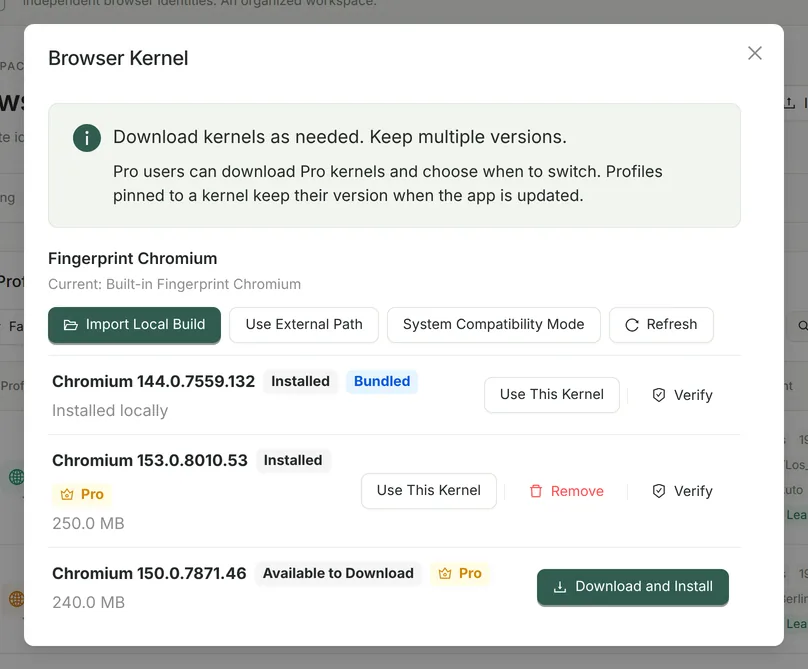
| Chromium 144.0.7559.132 | macOS Apple Silicon, Windows x64 | Community (also available in Pro) | Bundled with the installer, ready to use after installation |
| Chromium 150 series | macOS Apple Silicon, Windows x64 | Pro | Download in the app under “Browser Kernel” |
| Chromium 153 series | macOS Apple Silicon, Windows x64 | Pro | Download in the app under “Browser Kernel” |
Exact version numbers differ slightly between the two platforms; the versions listed under “Browser Kernel” in the app are authoritative. Kernels with major version 150 or higher are Pro kernels.
Why does Community use Chromium 144?
Chromium 144 is the most thoroughly audited stable baseline. It is bundled on both platforms and works as soon as you install Prism. Note that it reports Chrome major version 144 to websites, which is behind the current stable Chrome. If a newer version matters for your work, consider the Pro 150 / 153 kernels.
Pin a kernel per profile
- A profile’s kernel defaults to “Auto (match the app kernel)”. With Pro, you can pin a profile to a specific installed version in the profile editor. Pinning is recommended for long-term account profiles.
- Updating the app or switching the global kernel does not change pinned profiles.
- If the pinned kernel is missing, its manifest is damaged or the platform does not match, the profile refuses to launch and “Launch Diagnostics” shows the reason. It never silently switches to a different browser.
- Kernels that are in use or pinned by a profile cannot be deleted. Profiles pinned to a kernel version are rejected when imported on a device without an active Pro license.
Integrity checks and rollback
- Prism records the size and SHA-256 of each kernel’s key files (chrome.exe, chrome.dll and others on Windows; the main executable and Chromium Framework on macOS) and re-checks them when a kernel is activated, when a pinned kernel launches and when you click “Verify”.
- Pro downloads kernels from an Ed25519-signed version catalog over HTTPS and verifies SHA-256, with pause and resume. On macOS, Prism also checks the code signature, CPU architecture and version number. Prism does not switch to a kernel automatically after downloading it.
- If switching fails, click “Roll Back” to return to the previous kernel, or click “Use Bundled Kernel” at any time to go back to Chromium 144.
Import local builds and compatibility mode (Pro)
Developers who compile their own kernel can choose “Import Local Build” in “Browser Kernel” (select the .app on macOS or chrome.exe on Windows); Prism copies it and creates a checksum manifest. “System Compatibility Mode” can use the Chrome, Edge or Chromium installed on your computer to verify profile isolation, but fingerprint settings are not applied to system browsers. For build instructions, see the public repository README.