Consistent fingerprints from complete hardware templates
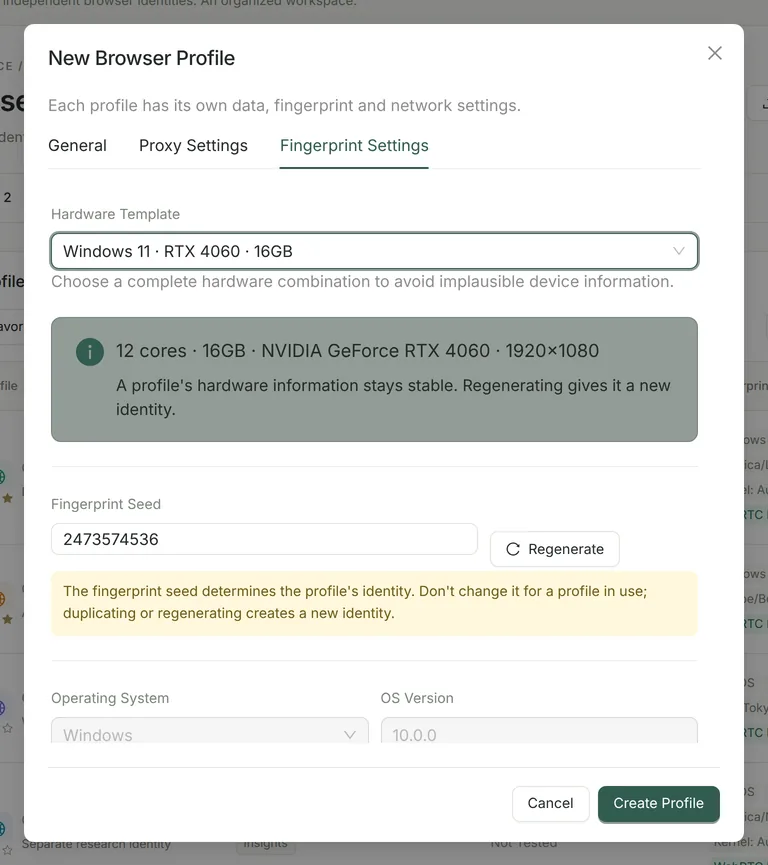
Each profile has a fingerprint seed and one of ten hardware templates (macOS: host hardware, seeded Apple GPU across 11 M1–M4 models, M1, M3 Pro, M4 Pro; Windows: host hardware, seeded NVIDIA GPU across 18 RTX 30/40 desktop models, RTX 3060, RTX 4060, RTX 4070). The template sets platform, CPU cores, screen and GPU together, so the identity stays plausible.
- Fingerprint settings are passed to a custom Chromium kernel at launch instead of being injected into pages as scripts, so windows, iframes, workers, OffscreenCanvas and AudioWorklet report the same identity. (The Pro window synchronizer and MCP do run page scripts through the DevTools protocol to read and act on pages.)
- Brand Chrome or Edge; the brand version automatically matches the real kernel version across the User-Agent, UA Client Hints and HTTP headers.
- Canvas, WebGL (renderer and pixels), WebGPU vendor, Audio and ClientRects vary per seed but stay stable for the same profile — no per-read random noise.
- Fonts: host fonts are kept for same-OS templates; cross-OS templates map target-OS fonts. Automation switches do not set navigator.webdriver to true, and the HeadlessChrome marker is removed.
A network identity per profile
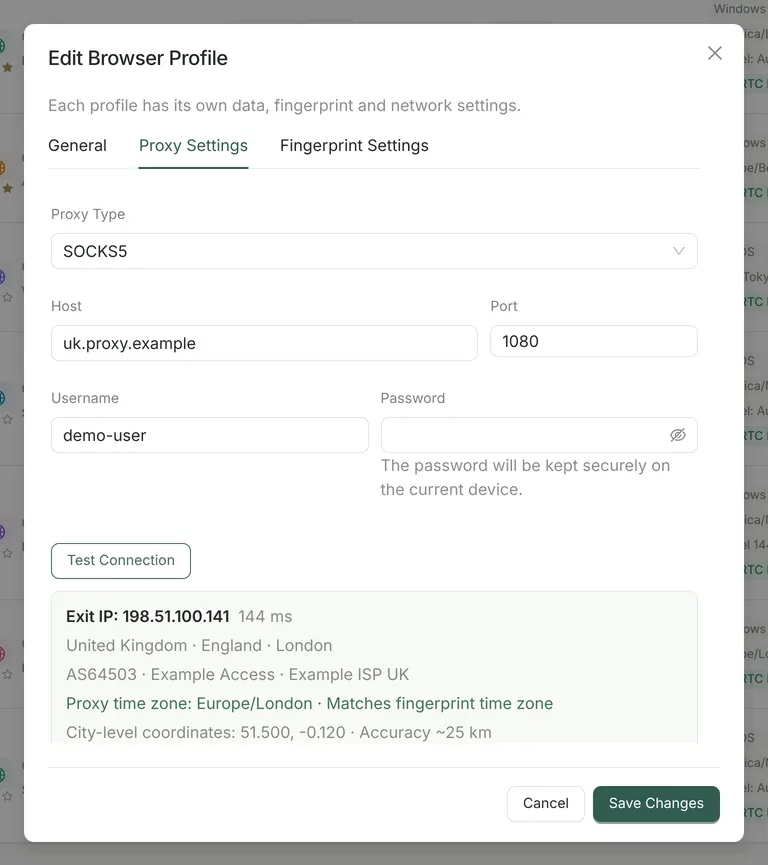
- Direct, HTTP, HTTPS or SOCKS5 with username/password. Authenticated proxies go through a local relay on 127.0.0.1, so credentials never appear on the browser command line; passwords are stored with macOS Keychain / Windows DPAPI when available.
- Connection test via ipwho.is and ipapi.co (fallback api.ipify.org): exit IP, IPv4/IPv6, country, region, city, ASN, organization, ISP, latency and Tor / VPN / proxy / datacenter flags when the source provides them. Bulk test up to 100 profiles.
- Network identity follows the proxy exit by default: language, Accept-Language (24 countries/regions), time zone and city-level geolocation (~25 km) are set before launch. Conflicting geo sources pause the launch for confirmation.
- Exit IP change policy (block by default), re-check every 5 minutes while running, and isolation of the profile if the exit changes or the relay fails.
- WebRTC leak protection (disable non-proxied UDP) by default; DNS resolved through the proxy; QUIC and DNS prefetch disabled when a proxy is used.
Bulk management and recovery
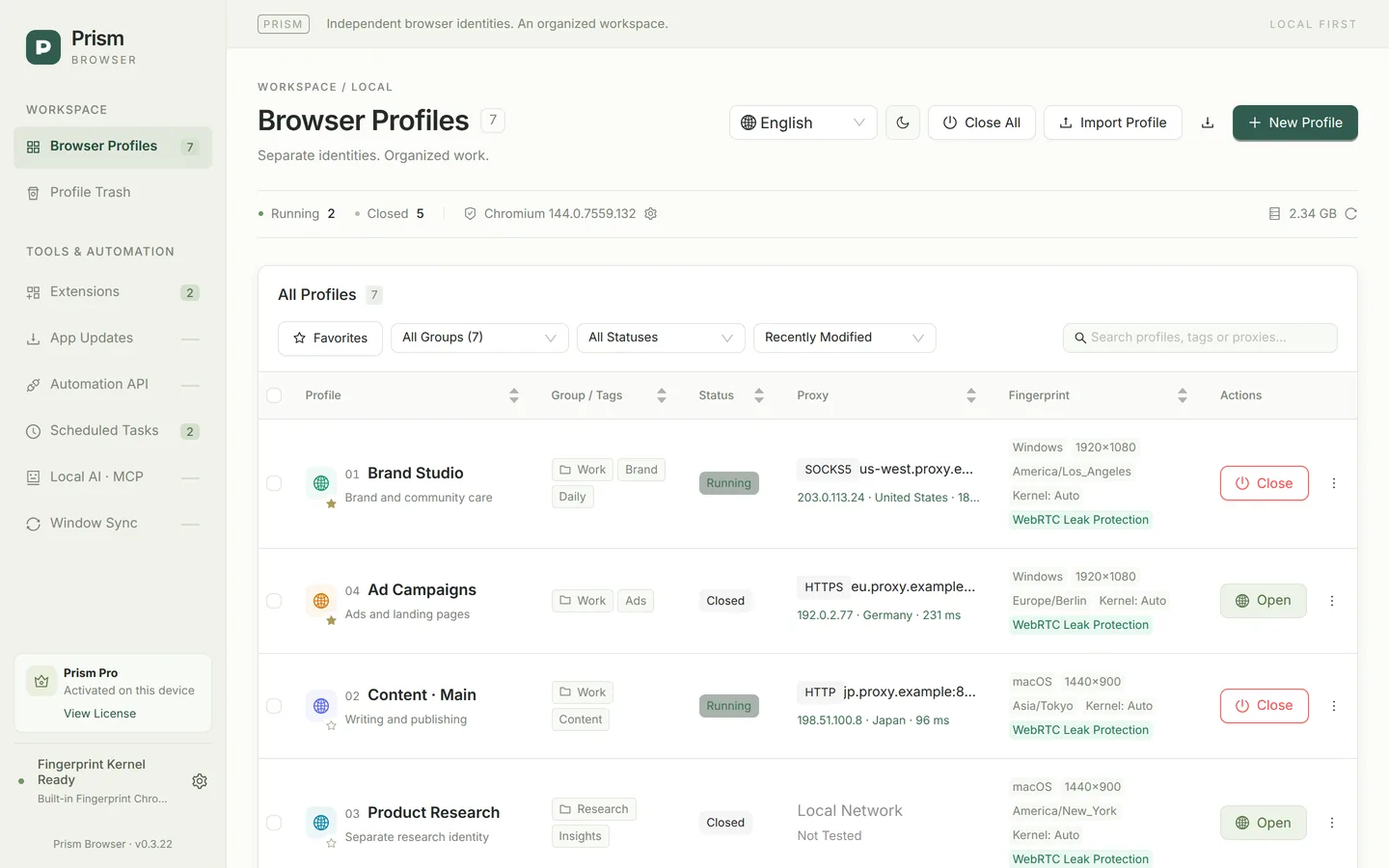
- Unlimited local profiles with permanent numbers, colors, notes, groups, up to 20 tags and favorites. Window titles show “[number] name”, and profiles are numbered on the macOS Dock and Windows taskbar.
- Bulk launch opens profiles one by one in number order, about 1.5 s apart (across the app, API and schedules at most 3 profiles are starting at the same time); bulk close, bulk proxy test, bulk group/tag changes and bulk delete.
- CSV import of up to 500 profiles per file, validated as a whole — one invalid row creates nothing.
- Deleted profiles move to the local Profile Trash with their browser data; restore or auto-purge after 7, 30 or 90 days.
- Launch diagnostics run up to 15 read-only checks (process, data directory, kernel, proxy, time zone, WebRTC, DNS, IPv6, hardware…) without starting the browser; WebRTC, DNS and IPv6 are judged from the configuration rather than leak-tested.
Cookies, backups and migration
| Method | Includes | Notes |
|---|---|---|
| Config file (*.prism-profile.json) | Proxy address, fingerprint seed and settings | No proxy password, browser data or extensions |
| Cookie import/export (JSON) | All cookies of the profile; common extension JSON formats accepted | Up to 10 MB / 10,000 cookies; files are unencrypted |
| Full backup (folder) | Complete Chromium user data plus a SHA-256 manifest | Imported as a new profile; backup folder is unencrypted |
| Workspace migration package (.prism-migration) | All profiles, proxy details including passwords, browser data and referenced local extensions | Encrypted with your password (scrypt + AES-256-GCM); up to 500 profiles |
Extensions
Paste a Chrome Web Store URL to download and install an extension (CRX3 signature verified), or import an unpacked extension folder. Pick up to 50 extensions per profile or enable one globally; extension data stays inside each profile. Extensions are not updated automatically.
Pro: synchronization, automation and AI
ProMulti-window synchronizerMirror clicks, typing, keys, scrolling, tabs and address bar input from a main window to follower profiles, with random per-action delays (0–120 ms by default, adjustable up to 5000 ms), grid tiling and bulk URL visits.ProLocal API & scheduled tasksLoopback-only HTTP API with a per-session bearer token to create, list, start and close profiles; once/daily/weekly tasks that launch or close profiles.ProLocal AI · MCPA local stdio MCP server with 58 tools. Only profiles you allow — one by one, or all profiles including new ones — are visible to the AI client, which can also create profiles if you let it. Pause it with the global switch or emergency-stop at any time.ProChromium 150 / 153 kernelsDownload newer kernels in the app, pin a kernel per profile, import local builds and verify SHA-256 integrity. Community uses the bundled Chromium 144.
What Prism does not include
- Cloud sync, team members or shared permissions — profiles stay on your computer.
- Proxy service, proxy API extraction or rotation — bring your own proxies.
- Mobile fingerprints, Linux, Intel Mac or Windows ARM builds.
- Visual RPA or custom script execution.
Get started
Download Community for free · Compare Community and Pro · What is an antidetect browser?